
TEETREFF · GOLF VERBINDET.
Golf GPS. See what is ahead.
Orientation helps on an unfamiliar course. TeeTreff brings your position, hole map and available green distances together with scoring and pace information on iPhone.
Open the web community ↗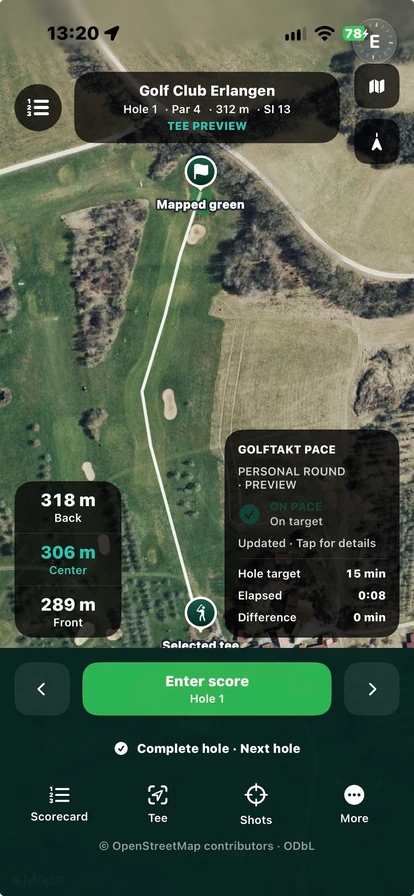
Understand the green distances
Choose the right golf course in the iPhone app and start your round. The GPS view shows available distances to the front, centre and back of the green. These reference points can help with club selection, but do not automatically identify the day’s flag position.
Check that you selected the right layout and current hole. Information depends on your device’s position estimate and the available mapping. If something looks wrong, compare it with the situation on the course rather than relying on a single number.
Hole maps, par and mapping coverage
Depending on the dataset, the view includes a hole map, par and hole information. You can move between holes. Not every field or map feature has the same level of completeness on every course.
A facility with several layouts may have several entries. A listed course does not automatically mean every hole has been fully checked. Read the course coverage page for context. Changes on the ground may require a later map update.
GolfTakt pace information inside TeeTreff
GolfTakt adds pace status, elapsed time and a comparison with the target time to the GPS view. It is integrated in TeeTreff, so no second app is needed. It helps you understand the progress of your own round.
The existing view is labelled Personal-round preview. It does not promise central club monitoring or a messaging connection to a marshal. Scoring and round history complement your personal round in the iPhone app; the web portal supports community and game planning.
YOUR NEXT ROUND